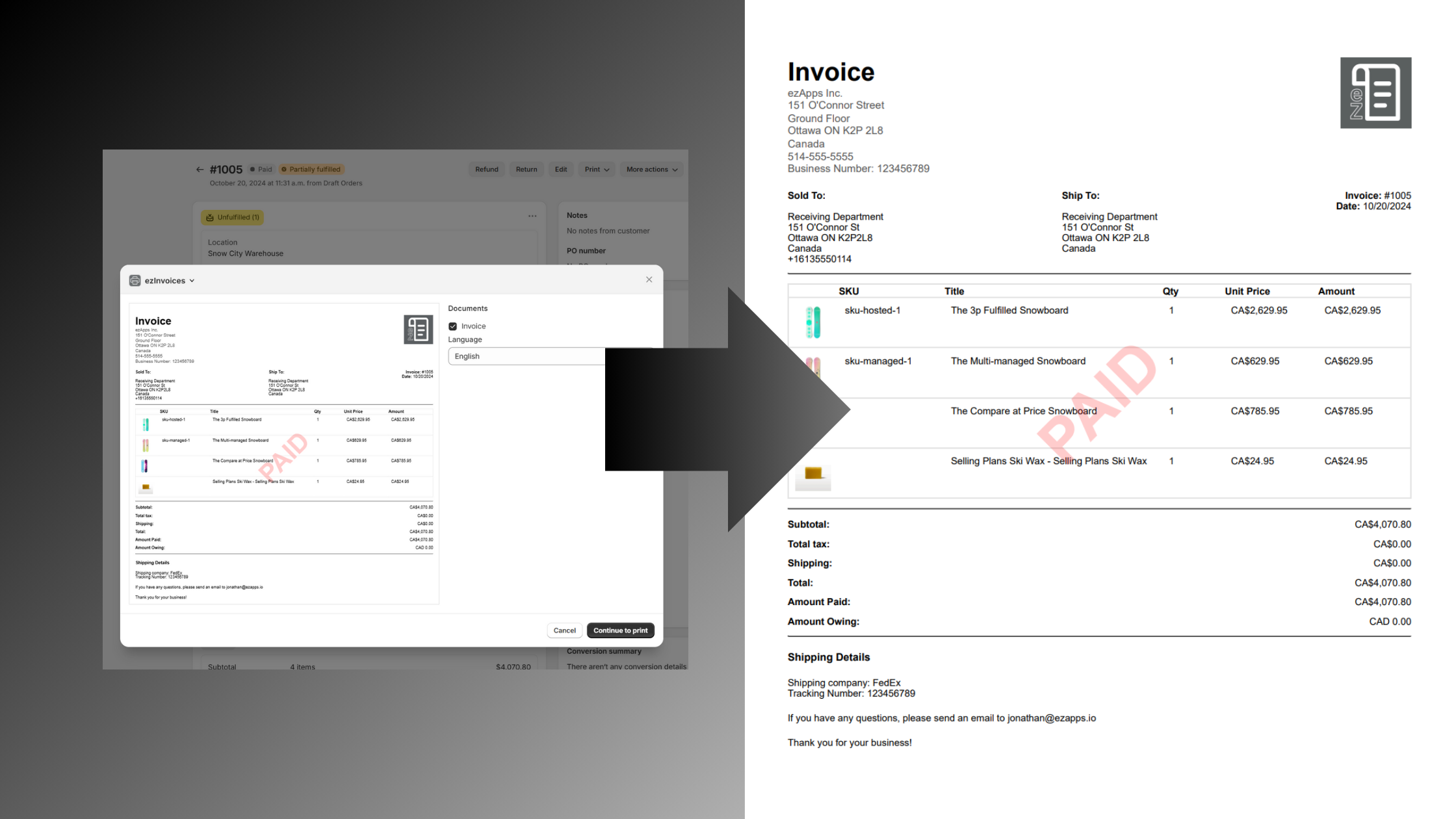
How to Create Professional Invoices in Shopify (2024 Guide)
Generate professional PDF invoices instantly in Shopify with ezInvoices. Step-by-step guide to create, customize & manage business invoices.
Understanding the Invoice Challenge in Shopify
For e-commerce businesses, managing customer invoices efficiently is crucial. While Shopify excels in many areas, its native invoicing capabilities have limitations. As a merchant, I frequently encountered situations where customers needed proper invoices, but our existing solutions were time-consuming and inefficient.
Common Invoicing Challenges
Traditional approaches to Shopify invoicing present several obstacles:
Manual Data Entry Burden: Creating invoices in external accounting software requires tedious copy-pasting and can take up to five minutes per order.
Limited Documentation Options: Shopify's built-in options like order confirmations and packing slips lack crucial invoice elements and may contain sensitive internal comments.
Compliance Concerns: Standard order documents often miss essential business information required for legal compliance.
Introducing ezInvoices: The Complete Solution
To address these challenges, we developed ezInvoices, a powerful yet user-friendly Shopify app that simplifies how merchants handle invoicing.
Key Features and Benefits
Instant PDF Generation
- Create professional invoices directly from order pages
- Save as PDF or print instantly
- Maintain consistent branding
- No more manual data entry
Comprehensive Business Information
- Automatic inclusion of legal business details
- Tax identification numbers
- Complete contact information
Professional Design Elements
- Custom logo integration
- Clean, modern template design
- Mobile-responsive layout
Global Business Support
- Multi-language capability (English, French, Spanish, German, Hindi)
- Automatic currency symbol adaptation
- Region-specific formatting
Smart Order Information
- Dynamic shipping and tracking details
- Payment terms and due dates
- Clear payment status indicators
Workclass Support
- Reach out to our support team if any feature is missing or you need help with anything.
- We respond within 24 hours.
Step-by-Step Implementation Guide
1. Installation and Setup
- Visit the Shopify App Store ↗
- Click "Add app" to install ezInvoices
- Complete the initial configuration

2. Configuration
- Navigate to ezInvoices settings
- Upload your company logo
- Verify business information
- Customize invoice preferences

3. Creating Your First Invoice
- Open any order in your Shopify admin
- Click the print menu
- Select "ezInvoices"
- Choose to print or save as PDF


What it in action in our walkthrough video:
Start Streamlining Your Invoice Process
Transform your Shopify invoicing workflow with ezInvoices. Visit our product page or download directly from the Shopify App Store ↗.
Related Reading
- ezInvoices Update - Languages & Feedback - Discover the latest features including multi-language support
- ezInvoices Earns Built for Shopify Status - Learn about our commitment to quality and security
- Browse All Blog Posts - Explore more tips and updates for e-commerce success
Related articles

What Real SaaS Support Looks Like (and Why It Matters for Accounting Tools)
Chatbots can't debug your GL. Here's why accounting tools need real humans and what that means when you're choosing integration software.
How to Reconcile Shopify Payouts in Sage 50 Without Losing Your Weekend
A practical method for matching Shopify Payments deposits to Sage 50, plus the integration approach that eliminates the reconciliation work entirely.
Why Reconciliation Breaks Long Before You Start Reconciling
Month-end problems originate weeks earlier in the data flow. Uncaught sync failures, missing refunds, and accumulated tax drift compound by close time.